Store/Gaming/FEEBZ VR Headset for iPhone & Android — Kids & Adults
Official Store
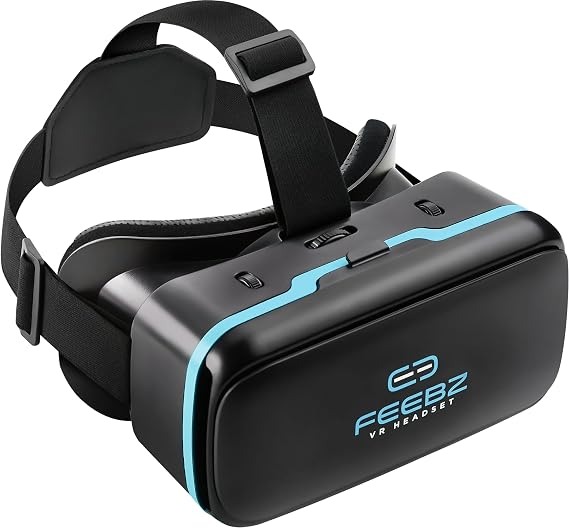
FEEBZ VR Headset for iPhone & Android — Kids & Adults
PKR 3,499PKR 4,99930 in stock
Smartphone VR goggles with adjustable focus, IPD dials, and a padded T-strap — fits phones from about 4.5" to 6.5".
Description
Turn a smartphone into a VR viewer for 3D videos, VR games, and immersive clips. Open the front panel, place your phone (about 4.5" to 6.5") in the tray, close the latch, and look through the lenses. The matte black headset with cyan FEEBZ branding is light enough for kids and adults with adult supervision. Three top dials let you tune the picture: a large centre wheel for focus/distance to the phone, and two side controls for interpupillary distance so each eye lines up with the lenses. A three-point elastic T-strap and rear pad keep the headset stable without pressing hard on the face foam. How to use • Install a VR player or YouTube VR / compatible 3D content on the phone. • Insert the phone, close the front panel, and put the headset on. • Adjust the centre dial until the image is sharp, then the side dials until there is no double vision. • Tighten the top and side straps so the foam sits evenly on the face. Good for Home VR, classroom demos, and kids’ 3D video sessions on iPhone or Android (use age-appropriate content and take regular breaks).
Quantity
1
30 available Nationwide delivery in 2–5 working days
Cash on delivery available
7-day return policy on eligible items